


Childcare software usually becomes valuable in the unglamorous moments: a parent needs to know whether a child has eaten, a center has to record a pickup, or an administrator needs to keep billing and learning information from being scattered across notebooks and messages. After spending time with brightwheel, my main impression is that it is designed to make those handoffs more organized rather than more complicated. It is a free education app from brightwheel, aimed at childcare settings and families, with a clear focus on daily communication, attendance, billing, and classroom routines.
I would recommend it most strongly when a childcare provider wants one shared place for operational details and parent updates. It is less compelling for a family looking only for a private baby journal, and it may feel broader than necessary for a very small arrangement between one caregiver and a few parents. The app works best when both sides actually use it consistently, because its value comes from connecting the center’s routine with the family’s view of the day.
How brightwheel fits into everyday childcare
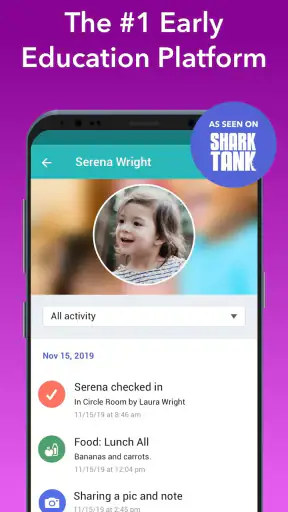
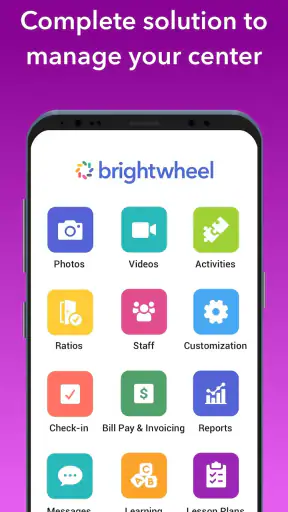
The app covers several jobs that are often handled separately. Its childcare tools bring together daily sheets, sign-in and sign-out, billing, and learning-related records. That combination matters because childcare administration is rarely just one task. A provider may be tracking attendance in the morning, sharing an update after lunch, recording a learning activity later, and answering a parent’s question about the day before closing.
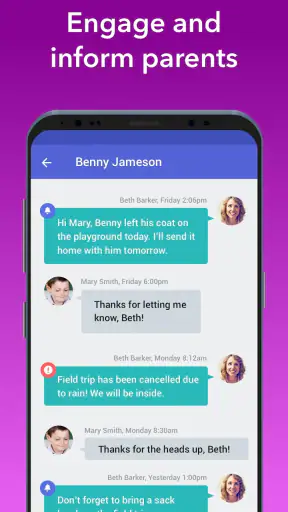
From a parent’s perspective, the useful idea is continuity. Instead of relying entirely on a paper sheet in a backpack or a stream of unrelated messages, the family can follow the information the center chooses to share. I found that approach more practical than treating communication as an extra feature bolted onto an attendance system. The daily record becomes part of the same workflow as arrival, departure, and classroom documentation.
The developer, brightwheel, has positioned the app for childcare management rather than general school administration. That distinction is important. A parent looking for homework, exam schedules, or older students’ classroom tools is looking in the wrong place. The app makes more sense for daycare, preschool, and similar early-childhood environments where care information and learning observations overlap.
Its audience also explains why the interface needs to serve people with very different priorities. Staff members want quick, repeatable actions during a busy day. Parents want understandable updates without having to learn an administrative system. Managers need a broader view of attendance and payments. A good childcare app has to balance those needs, and brightwheel’s feature mix shows that balance clearly.
The strongest part: connecting care records with parent communication
The most convincing strength is the way routine information can become visible to families without requiring staff to maintain several separate channels. Daily sheets are not exciting, but they answer the questions parents commonly ask after pickup: How did the day go? Were there meals or rest periods? Was anything notable recorded? When that information is kept current, it can reduce uncertainty and make the end-of-day conversation more meaningful.
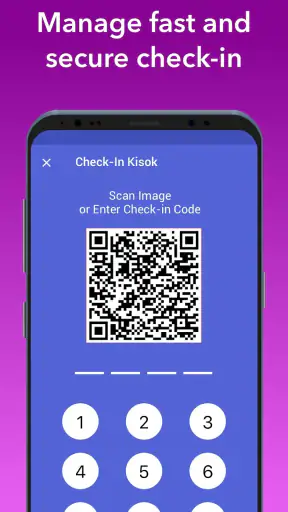
Sign-in and sign-out are another practical foundation. In a childcare setting, attendance is not merely a list of names; it is part of the daily safety and handoff process. Having arrival and departure information in the same environment as family communication can help prevent the confusion that comes from a paper sheet, a separate spreadsheet, and messages living in different places. I would still treat careful staff procedure as essential, but the app gives that procedure a more coherent home.
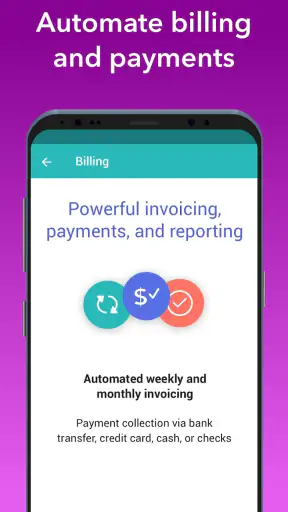
Billing adds a different kind of value. Parents and providers often dislike discussing payments because details can be spread between invoices, reminders, and manual records. Bringing billing into a childcare-focused app can make the administrative side feel less detached from enrollment and attendance. It does not remove the need to check charges carefully, but it can make the relationship between the center and the family easier to manage.
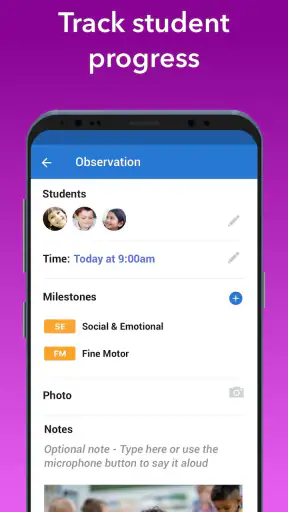
The learning tools are useful when they are treated as observations rather than as a replacement for a full learning-management system. Early-childhood development is often documented through small moments: participation, emerging skills, social behavior, or a child’s response to an activity. A childcare platform can help staff preserve those moments and share them in a way that feels connected to the child’s day.
One non-obvious benefit is the ability to use the app as a shared timeline for conversations. If a parent notices a change at home, staff can consider it alongside the child’s recent routine. If a teacher records a pattern in participation or rest, the family has a clearer starting point for discussion. This does not turn the app into a professional assessment tool, but it can make communication more specific than a general “everything was fine.”
A realistic day with the app
Imagine a parent dropping off a toddler before work. The center records the arrival, and the family later receives the kind of daily information the center has chosen to document. During the day, staff can keep care notes and learning observations together instead of trying to remember them at closing time. At pickup, the parent can review the day and ask about something concrete rather than reconstructing events from memory.
For the center director, the same day looks different. Attendance and departure records support the operational side of the business, while billing belongs to the administrative side. The director does not need to treat parent communication, classroom documentation, and payment follow-up as entirely unrelated activities. That unified view is where brightwheel has more practical appeal than a simple messaging app or a standalone digital diary.
A useful habit would be to record information close to the moment it happens, rather than trying to complete every daily sheet at the end of the afternoon. That approach can improve accuracy and reduce the risk of turning the app into a rushed clerical task. Parents should also read updates as a running record, not as a substitute for speaking directly with staff when a concern is important.
Where the experience can become frustrating
The same breadth that makes brightwheel useful can also create friction. A parent who only wants occasional photos or a basic note may find attendance, learning, and billing functions more extensive than necessary. The app is built around a childcare organization’s workflow, so the experience depends heavily on what the center has enabled and how consistently staff maintain it.
That dependence is the most meaningful limitation in my view. No childcare platform can make incomplete entries feel complete. If one classroom records detailed updates while another records only the minimum, families may experience the app differently from day to day. The technology can organize a process, but it cannot replace staff time, clear policies, or thoughtful communication.
There is also a learning curve for administrators. Combining daily care, sign-in and sign-out, billing, and learning records means that a center needs to establish sensible routines before expecting the app to run smoothly. Staff may need guidance on what belongs in a daily sheet, which updates are useful to parents, and how to keep attendance and billing information accurate. Without that shared discipline, more features can mean more places for inconsistency.
Parents should not assume that every center uses every part of the app in the same way. The practical experience is shaped by the provider’s setup, communication habits, and expectations. Before relying on it, I would ask the center which information it records, how quickly updates are usually posted, and whether billing and attendance are handled through the same account. Those questions are more useful than judging the app only by its feature list.
Another trade-off is attention. Frequent notifications can be helpful when they contain meaningful updates, but less useful when they encourage parents to check repeatedly for minor changes. I would recommend adjusting notification habits around the family’s needs and using the app as a dependable record rather than constantly monitoring it. The goal should be calmer communication, not another source of digital noise.
Who should use it, and who may prefer something simpler?
brightwheel is a strong fit for childcare centers that want to combine family communication with attendance and administrative work. It is especially suitable when a provider is moving away from paper-based daily sheets, disconnected messaging, or manual payment follow-up. The app’s value increases when several staff members need to follow the same routine and parents want a consistent view of what is happening.
It can also suit parents whose childcare provider already uses it actively. In that situation, the decision is less about choosing an independent parenting app and more about having a clear window into the center’s established workflow. Families who appreciate organized records, digital sign-in information, and regular care updates will likely get the most from it.
I would be more cautious if you are arranging informal care with a single babysitter or a relative. A personal notes app, shared calendar, or lightweight messaging service may be faster for that situation. Those alternatives will not offer the same childcare-management structure, but they may avoid the overhead of adopting a system designed for a center with multiple rooms, staff members, and families.
It is also not the right choice for someone seeking a complete school platform for older children. The focus here is early childcare: daily care, family handoffs, attendance, payments, and learning observations. If your main needs are assignments, grades, advanced academic communication, or school-wide course management, a conventional school portal will be a better match.
Practical points to consider before committing
The app is free, which removes an obvious barrier for families trying to access their provider’s chosen system. Still, “free” does not mean the experience is effortless. The center’s onboarding process, account invitations, staff training, and communication rules will matter just as much as the download itself. I would judge the service by the complete childcare workflow, not only by the cost of installing the app.
Its Everyone age rating makes sense because the application is used by adults around children rather than being a children’s game. That does not mean every feature will be equally relevant to every family member. Parents may primarily use updates and billing, while staff and administrators handle attendance and learning documentation.
The app has been available since August 25, 2014, and its reach is reflected in more than one million installs. It also holds a 4.7 average from around eleven thousand ratings, alongside roughly three thousand eight hundred written reviews. Those figures suggest that many users find the overall concept dependable, but they should not replace checking whether your own childcare provider has a well-defined process for using it.
One tip I would give new users is to establish a simple review routine. Check the day’s information at a convenient time, save questions for pickup or a direct conversation, and use billing records when discussing payments rather than relying on memory. This prevents the app from becoming either something ignored or something checked obsessively.
A second tip is to distinguish between a record and an alert. A daily note may be useful context without requiring an immediate response. Attendance or payment information may deserve quicker attention. Treating every entry with the same urgency can make childcare communication feel more stressful than it needs to be.
A third is for providers: decide what “complete” means before asking staff to document everything. A short, consistent record entered at the right time is often more useful than ambitious notes that are completed late or unevenly. brightwheel can support a thoughtful routine, but the routine needs to be designed by the center.
My final assessment
I see brightwheel as a practical childcare-management app with a clear thesis: the daily experience of a child, the communication with parents, and the administration of a center should not be kept in separate systems. Its strongest evidence is the combination of daily sheets, sign-in and sign-out, billing, and learning tools in one childcare-focused environment.
That combination is not automatically perfect. The app can feel excessive for informal care, and its usefulness depends on staff consistency and the provider’s chosen workflow. Parents should also understand that installing it does not guarantee detailed updates or instant answers; those depend on how the center operates.
For a daycare or preschool already committed to using it, I think it is a sensible tool and likely easier to live with than a patchwork of paper forms, personal messages, and separate payment records. For a family choosing an app independently, I would first ask whether you actually need childcare administration or simply a private journal. If you need the former, brightwheel deserves a serious look. If you need the latter, a simpler option may be more comfortable.
Overall, I would recommend it to childcare providers and families who value organized handoffs and shared records. Its real strength is not any single feature, but the way it joins the small operational details of childcare into one ongoing conversation.


